Project 02 · Business software
Stock Counting Platform
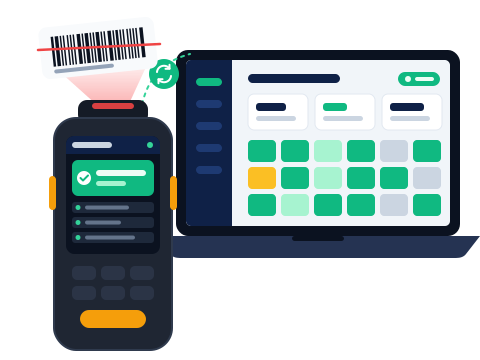
An end-to-end platform for a company that counts stock overnight in shops and warehouses: from the scan on a handheld to the live board and the delivery reports. The client's name is withheld for confidentiality.
The problem
Stock-counting companies count shops, warehouses and convenience stores mostly at night, after closing, with small teams. Results are usually merged by hand in Excel: shelf locations are typed manually and often missing, discrepancies are re-checked from memory, and nobody can see how far along the count is. Some stores have no phone signal at all.
The goal was clear: not a single scan lost, none counted twice, and the delivery reports ready the moment the count ends.
Parts
- Counting app (Android phones and handhelds): barcode scanning with the camera or a hardware scanner that types like a keyboard, product card, quantity entry, undo, switching zones by scanning a zone label, and a decision screen for unknown barcodes.
- Management program (Windows; the same interface also runs in a browser): counting sessions, stores, team and devices, zone assignment and printed zone labels, product list import from Excel, Accept / Reject / Recount decisions for discrepancies, and a full-screen live board.
- Server: runs in the cloud, or on a laptop on site in stores with no signal. Either way, the apps talk to it the same way.
Working offline
Every scan is saved on the device before it appears on screen. Pending scans stay on the device until the server confirms it has received them. Each scan carries an ID created on the device; the server never records the same ID twice, so resending is always safe.
Records are never deleted or changed; a correction is added as a new "void" or "recount" record. A scan the server rejects doesn't silently disappear; it is held for a supervisor to resolve. If two people scan the same zone, the second person's scans aren't rejected but flagged as "contested" and shown on the board.
Live board
The supervisor follows the count live on a computer: finished zones, share of products counted, number of scans, net discrepancy and estimated finish time. A zone map shows status by colour (waiting, counting, done, verified, recounting, contested). For each counter you see scans per minute and unsent scans. Alerts appear for offline devices, low battery and unknown barcodes.
Reports
- Excel: count report (book stock, counting passes, final count, difference and decision), templated export for the client's own system, full event log and counter performance.
- PDF: report with cover page, summary, uncounted items, closing report and zone barcode labels.
Decisions we made
- An append-only event log instead of off-the-shelf sync
It keeps the "who counted what, when, on which device" trail and makes counting the same scan twice structurally impossible. Ready-made solutions that sync by merging records were rejected because they lose that trail.
- One server for cloud and site
Terminals don't need to know which server they are talking to; the same software runs in the cloud and on a laptop on site. The trade-off: the laptop on site can become a single point of failure, so making the cloud the default and the laptop the fallback is being considered.
- Ordinary phones first
No special handhelds are needed on day one: a phone camera or a keyboard-style scanner is enough. Support for device-specific scanners was kept separate so it can be added later.
- Safety gates over automation
Blind counting is the default; only a supervisor can start a recount, and nothing is approved automatically. A count can't be closed while there are unsent scans, open recounts or held scans.
Security
There are admin, supervisor and counter roles, and permissions can be switched on or off per person. Each company's data is kept apart at the database level. In blind counts, counters can't see book stock or the board. Scans and device logins are kept in an append-only trail; even if a counting session is deleted, its scans are not lost.
Status
The platform is in development; a field pilot hasn't taken place yet. We'll update this page as results come in.
Have a similar need?
If you're looking for software that works in the field, doesn't lose data without internet, or takes over hand-maintained spreadsheets, describe it in a few sentences.